Calibration Check
A one-click check of your EOS R and lens. In a minute or so it shows whether your kit is working as it should.
AvailableNo adjustment to calibrate, but FoCal can still test it.
The EOS R focuses with the image sensor itself and has no autofocus adjustment for FoCal to set. If it does need adjusting, that’s a job for a Canon service centre.
What FoCal can do with it
Supported in FoCal 2.10 and later, over USB-C or Wi-Fi. Tests: Calibration Check, AF Consistency, Aperture Sharpness, MultiTest, Stabilisation Test and Dust Analysis.
A one-click check of your EOS R and lens. In a minute or so it shows whether your kit is working as it should.
AvailableHow repeatable is the EOS R’s autofocus? Defocus between shots in one or both directions and see.
AvailableWhat happens to sharpness as you change aperture, and which aperture is the sharpest.
AvailableA two-dimensional view of the lens: focus position across the aperture range, showing any focus shift.
AvailableHow much does stabilisation really help? See the quality change as the shutter speed slows.
AvailableCount the dust spots on the sensor and see how much they matter, before you decide on a clean.
AvailableThe EOS R does not support any form of focus adjustment.
Not availableThis feature is not yet available for the EOS R.
Not availableCalibration Check (AF System Check) is free in FoCal Mobile.
FoCal IQ statistics show how much calibration changes the autofocus of each camera, from results FoCal users share. The EOS R can’t be calibrated, so there’s no calibration value to collect.
Your Calibration Check and test results are still kept and compared in FoCal.
FoCal IQFoCal controls the EOS R over USB. Use the cable that came with the camera or a good-quality one, and avoid extension cables: a poor cable is the first thing we suggest changing if FoCal is unreliable.
FoCal can also use the EOS R’s Wi-Fi. Turn on the Wi-Fi option for Canon in FoCal’s settings first, then see Connecting over Wi-Fi.
When you first connect, allow access to the Photos Library and to Removable Media. FoCal needs both to talk to the camera.
In FoCal, open then , expand and click . Restart FoCal and it will ask again.
First: turn on the Canon Wi-Fi option in FoCal (Help › Settings, General tab), or FoCal won’t find the camera.
Open the Tools menu, page 4, and choose , then . Set to .
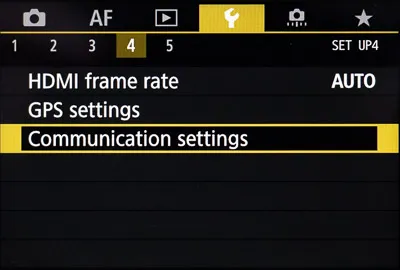
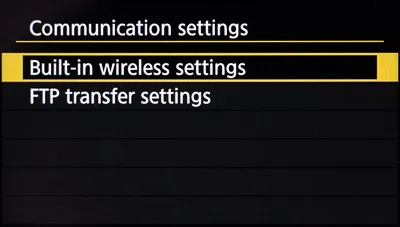
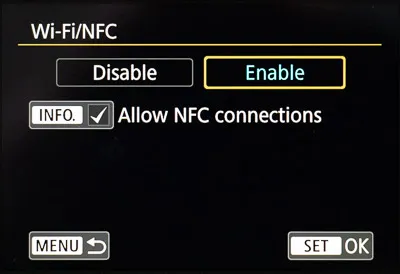
Choose , then .
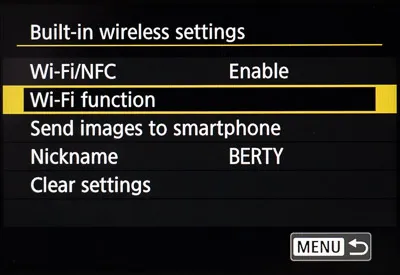
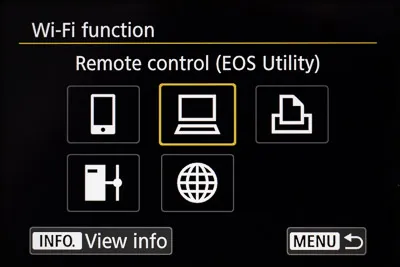
Choose , so the camera makes its own network. It shows the network name (SSID) and password: connect your computer to it, then press on the camera.
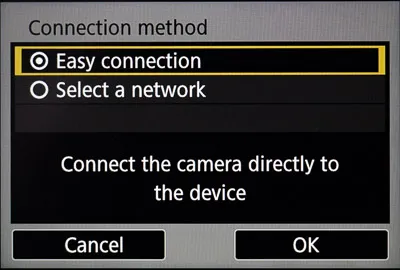
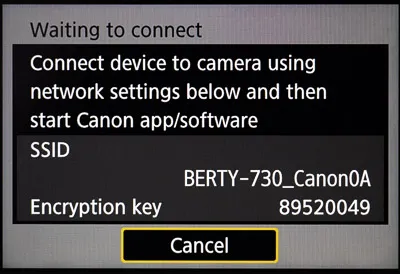
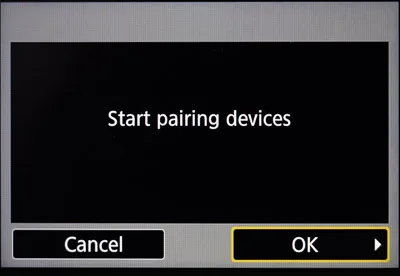
In FoCal, go to the Camera page and click Connect. You must then press on the camera. After a moment the camera screen goes black as FoCal takes control.
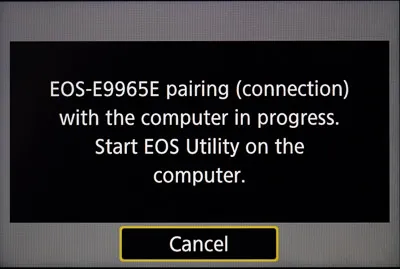
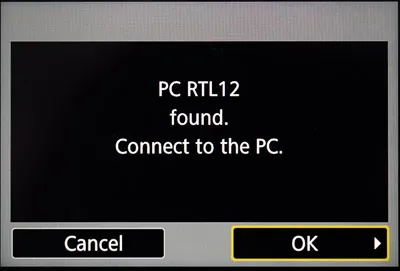
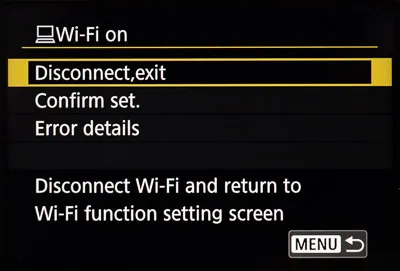
On the page choose and . Pick your home or office network from the list.
For most home networks choose , then enter the network password. The camera shows while it connects.
On the page, is right for most networks.
When the camera shows , press . FoCal should find the camera within a few seconds.
More on hotspot (“easy”) and infrastructure connections in the camera network help.
Ground-floor rooms vibrate less when people move about or traffic passes, and vibration affects the results.
Keep it flat so it can’t move. A FoCal Hard Target is what we use for all our development and testing.
Avoid fluorescent and LED lights, which can flicker in a way you can’t see but the camera can, and changeable daylight. FoCal copes with small changes in light, not big ones.
If your tripod has a hook under the centre column, hang something heavy from it. With big lenses, mount the lens’s tripod collar, not the camera.
The Target Distance Tool in FoCal tells you how far from the target to be, with or without the camera connected.
Target Setup, FoCal’s guided setup, checks the position, light and settings before a test. More in the FoCal help.
Low batteries can make tests fail or the camera behave strangely.
Grips add vibration on a tripod.
Roughly is fine: Target Setup confirms the position.
If the EOS R has a photo/video switch, set it to Photo.
If you’re connecting by USB, turn the EOS R’s Wi-Fi off: it can interfere.
If the camera lets you limit its options, allow Aperture Priority and Manual, Spot and Matrix/Evaluative metering, and all apertures, shutter speeds and ISO values.
Most FoCal tests use it. FoCal asks if a test needs something else.
Set the autofocus mode to : a half-press of the shutter button locks focus and then stops.
No automatic point selection: you should see one fixed AF point, in the centre.
FoCal may use the lens’s whole focus range, so set any focus limiter on the lens to off or the full range.
Turn off any stabilisation on the lens: it can make the results less accurate.
With the EOS R, FoCal Plus gives you Calibration Check. FoCal Pro adds the rest of the Kit Health Check, with trends over time.
Quick and simple autofocus tuning.
Tune, analyse and compare. Everything you need for a Kit Health Check.