Camera Setup - Settings
Setting up the Camera
FoCal controls the camera, but some settings can't be changed from the computer, so set these before you run a test. Where it can, FoCal checks the settings before a test and shows a message if the camera isn't set up correctly.
Don’t Limit Settings
Where available on the camera you should ensure that the custom settings do not limit the choice of AE Mode (ensure A/S/M are allowed), or limit the shutter speed, aperture or ISO range. Failure to observe this requirement may lead to unexpected issues when running tests.
Ensure correct focus mode
You must ensure the AF mode is set to ONE SHOT (Canon) or AF-S (Nikon) :
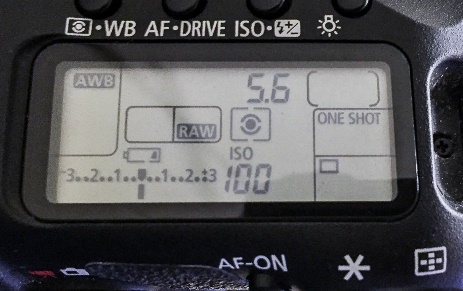 | 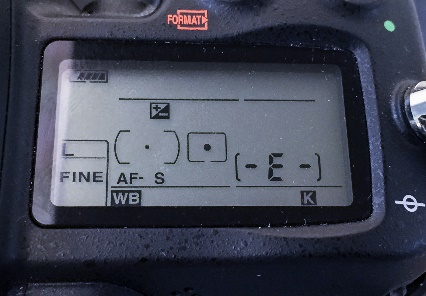 |
| Canon – choose ONE SHOT | Nikon – choose AF-S |
CANON ONLY: For the cameras which support spot AF (e.g. Canon 7D, 7D Mark II, 5D Mark III and 1D X and later), you should choose the normal single point AF mode (not Spot AF) – the software is not able to validate this and the results may be less accurate if you are in the wrong mode.
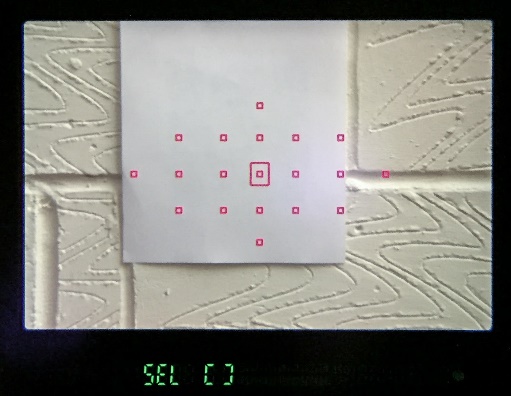 | 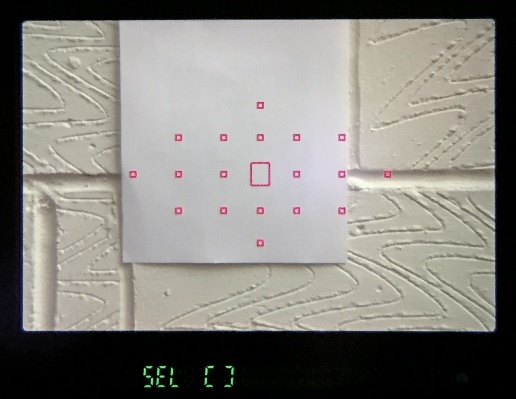 |
| Spot AF - Incorrect | Normal AF - Correct |
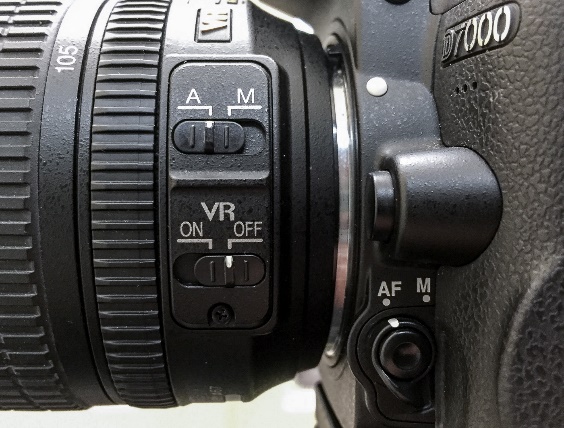
Disable Stabilisation
If you are using a lens with IS (Image Stabilisation) or equivalent it is recommended that this is switched off.
Disable Focus Limiter (ensure maximum range)
If you have a lens with a focus limiter (e.g. the Canon 100 f/2.8L IS Macro or the Canon 100-400L IS), please ensure it is set appropriately for the test distance.
Ensure good light
The minimum light level for Focus Calibration is around an EV of 5 (1/4s at f/2.8, ISO100), but the lighter the environment the more reliable and consistent the AF performance of the camera will be, therefore leading to better results. It is recommended that the light level on the target is around an EV of 8 (1/30s at f/2.8, ISO100) or above. Details of the lighting requirements are discussed in The FoCal Target.
Camera Connection Mode (approx. Pre-2009 Nikon only)
NIKON ONLY: If available, the camera USB mode in the SETUP menu must be set to PTP/MTP (and NOT Mass Storage) otherwise the camera will not correctly communicate with the computer and FoCal will not be able to connect to the camera.
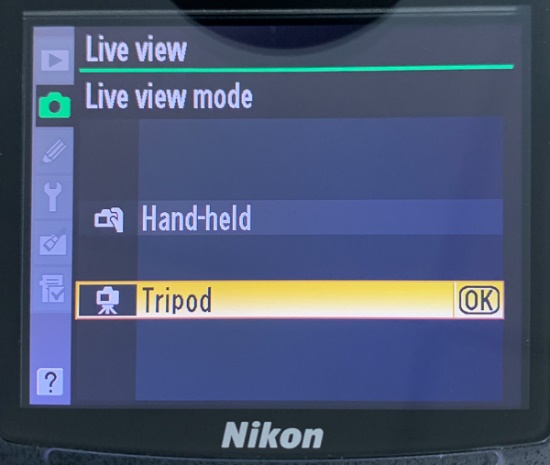
Tripod Mode (approx. Pre-2009 Nikon only)
NIKON ONLY: The Live View mode in the SHOOTING menu should be set to Tripod (rather than hand-held) if available on the camera (this setting is only available on older Nikon cameras). This is an important setting to ensure correct operation of tests.
Behaviour of different lenses
FoCal has been developed and tested regularly with a wide range of lenses, and then been through an extensive beta testing program with hundreds of different lenses of all types.
During the testing and development, it was noted that the consistency of the focus with the cheaper and older designed lenses (e.g. the Canon EF 50mm f/1.8) was poorer when compared to professional lenses. This makes it more difficult to calibrate as two shots (at the same microadjustment value) can produce quite differently focused images!
It’s worth noting that the AF microadjustment “step” size is different for different lenses. If the step size is small and the lens is not particularly sharp, it is quite possible that there is more than one perfectly valid AF microadjustment value (in the case of our in-house Canon EF 24-70mm f/2.8L lens, it is a very soft copy and AF microadjustment values between about 2 and 5 give exactly the same results visually. In this instance, FoCal can quite legitimately return calibration results anywhere between 2 and 5).
Zoom Focal Length
Zoom lenses can be calibrated at whatever focal length you choose, but as stated above the calibration will only be the ideal result for the selected test setup – which includes focal length.
So, if you calibrate a 24-70mm lens and find that you get a value of +4 for 24mm and +7 for 70mm, you have a choice. Setting +4 will give better results close to 24mm, and if you mainly shoot at this end then that’s probably a good choice. If you mainly shoot at 70mm, choose +7. If you use the lens at all sorts of focal lengths, maybe choose +5 or +6 as an in-between.
While this may sound a bit of a hack, Canon have openly admitted that a single AF microadjustment value is not appropriate for a zoom lens by offering the feature in the newer cameras (starting from the Canon EOS-1D X) of entering AF microadjustment values for both ends of the zoom range.
Generally, the advice is to calibrate at the telephoto end of a zoom lens (e.g. 70mm in the example of the 24-70mm). The depth of field at the telephoto end will be shallower so will lead to an easier to obtain result from testing. FoCal lets you test easily at both ends, so it's worth getting values for both, then deciding which value to enter on the camera. On cameras with separate Wide and Tele adjustments, FoCal can set both. FoCal 6's Kit Status and Analysis also track zoom lenses separately at their wide and tele ends.