Tripod/Handheld Difference – Stabilisation Test
(See Chart Features for general chart features, such as changing the scale and copying to the clipboard.)
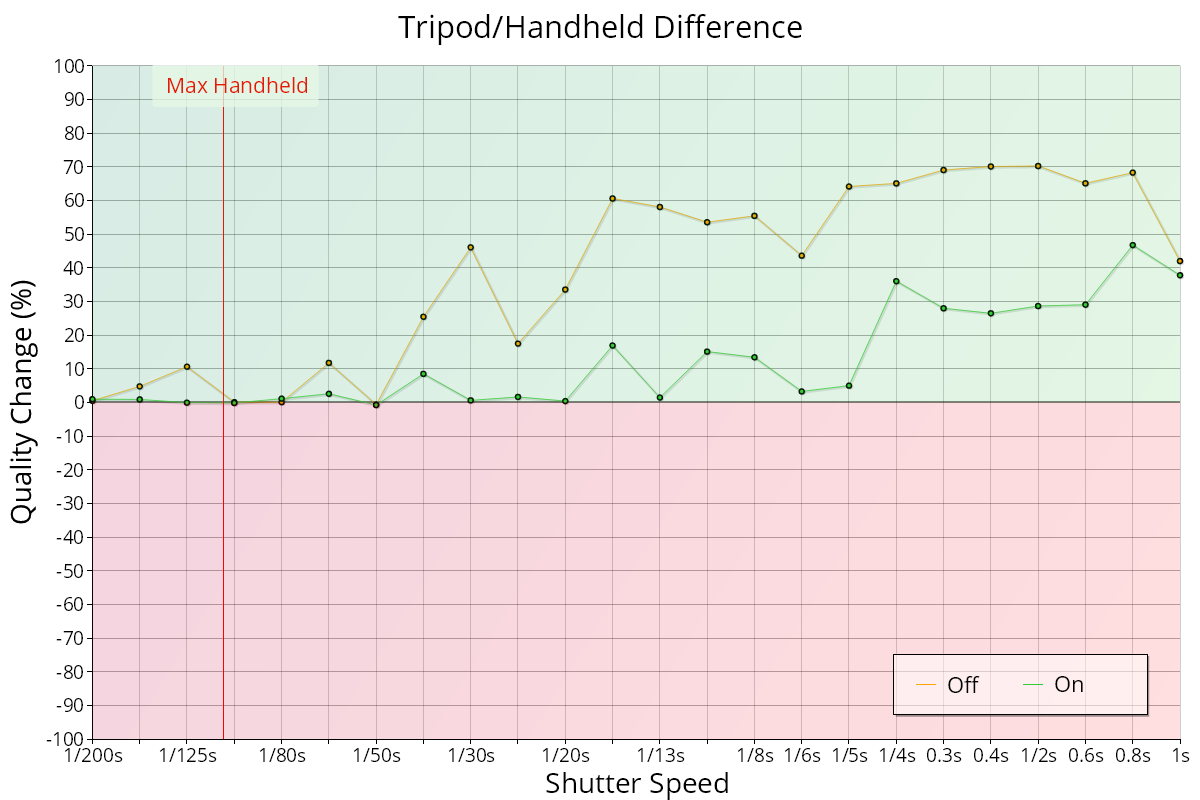
The Tripod/Handheld difference chart shows the percentage quality change between handheld and tripod scenarios with the stabilisation system both enabled and disabled.
Key:
- Orange line: the quality difference between handheld and tripod scenarios with the stabilisation system disabled.
- Green line: the quality difference between handheld and tripod scenarios with the stabilisation system enabled.
A value above 0 indicates that the quality is better when the camera is on a tripod, and a value below 0 indicates that the quality is better when the camera is handheld.
Interpretation
This chart is only available if you ran the test with Test on Tripod turned on, so there are both tripod and handheld shots.
Each line shows how much better the quality is on a tripod. In the example above, there's little difference down to around 1/40s; after that, the lines separate.
The higher orange line from 1/40s shows that with the stabilisation system disabled the image quality is significantly improved by mounting the camera on a tripod.
The lower green line shows that the quality is improved from around 1/4s by mounting on a tripod, even with the stabilisation system enabled.
This shows that the practical limit of this particular stabilisation system is up to around 1/4s, and with shutter speeds slower than this it is advisable to use a tripod in all cases.