Corner Brightness Profile – MultiTest
(See Chart Features for general chart features - changing scales, copying to clipboard etc)
What this shows
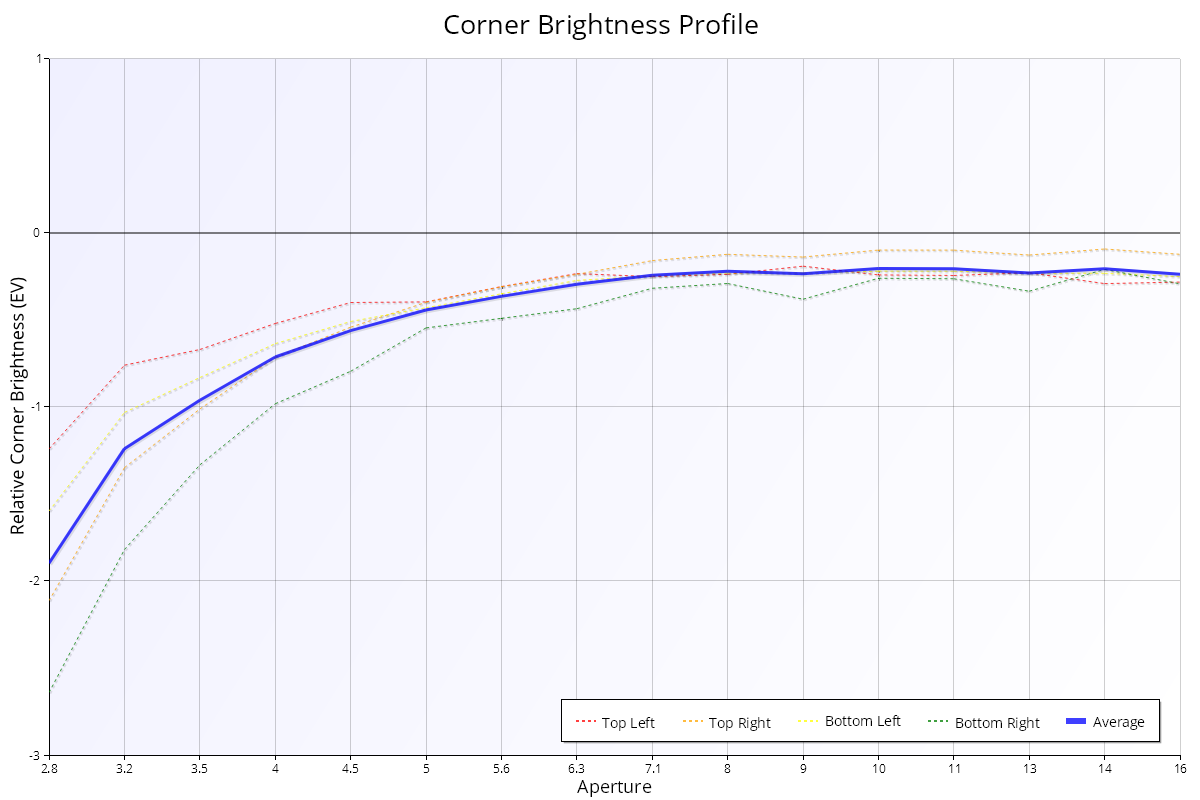
The Corner Brightness Profile shows how bright the corners of the image are compared with the centre, at each aperture. If the corners of the frame are evenly lit and not completely dark, it gives an idea of the vignetting (corner darkening) of the lens.
How to read it
- X axis: aperture, from wide open on the left.
- Y axis: relative corner brightness in stops (EV), from -4 to 0. 0 means the corner is as bright as the centre. FoCal compares with the centre of the image to remove normal exposure differences between shots.
- Dashed lines: each corner. Red is top left, orange top right, yellow bottom left and green bottom right.
- Thick blue line ("Average"): the average of the four corners.
What good looks like
The corners get brighter (closer to 0) as you stop down, and the four corner lines stay close together. Most lenses vignette noticeably wide open, especially fast lenses.
If it looks wrong
- One corner much darker than the others: check the lighting is even across the wall behind the target, and that nothing (such as a lens hood or filter) is blocking a corner. If it repeats with even light, the lens may be misaligned.
See Corner Brightness Profile – Aperture Sharpness for a detailed explanation.