Details - MultiTest
On this page
- Test ID
- Shot Count
- Diffraction Limited Aperture
- Best Aperture
- Absolute Peak Info
- Best Wide (focus adjustment)
- Best ARQS (focus adjustment)
- Refocus Quality Improvement
- Calibrated Quality Improvement
- Astigmatism Factor
- Red-Blue Ratio
- Red:Green and Blue:Green
- Image Motion
- Spectral Info
- Camera Info
- Lens Info
- Target Distance
The Details tab (FoCal Pro) shows the full results of the test. Some results are only available when the test uses camera focus adjustment.
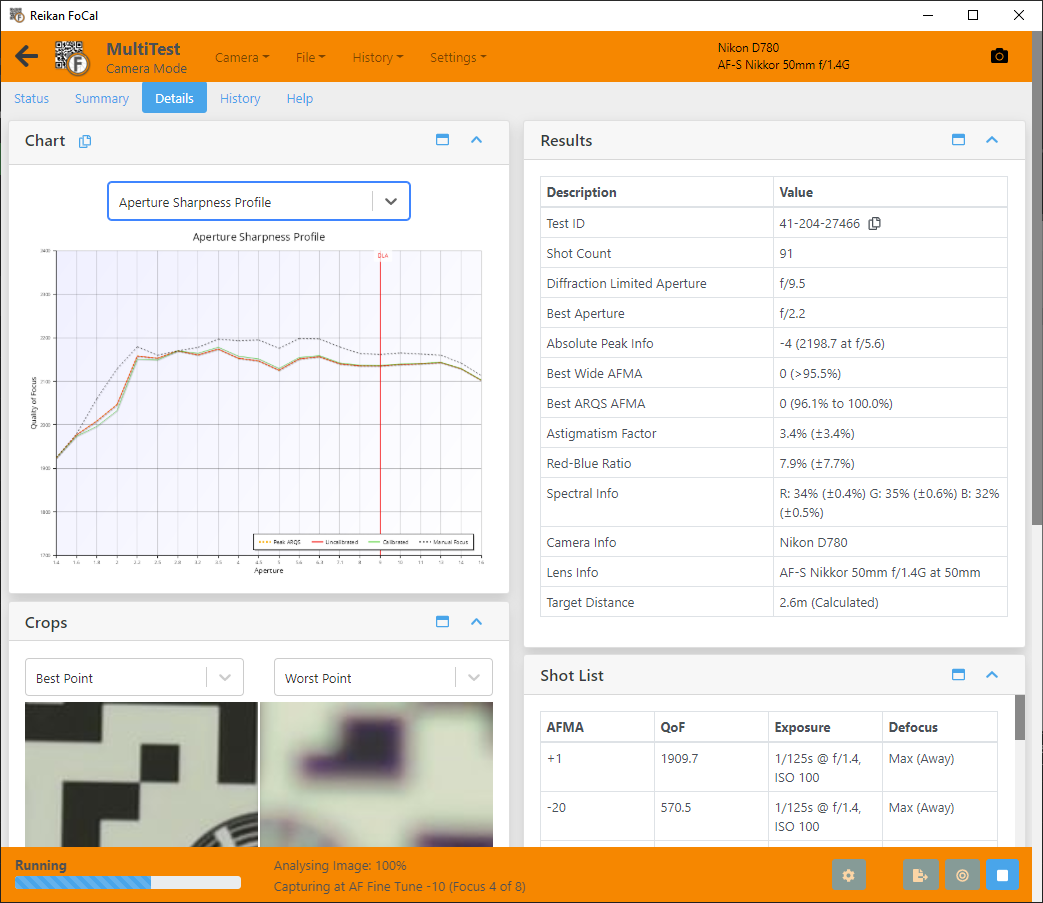
Test ID
A unique identifier for this test. Quote it when you refer to the test, for example when you contact Reikan support.
Shot Count
The number of images the camera captured for the test.
Diffraction Limited Aperture
The aperture at which diffraction starts to soften images on this camera. Stopping down further than this makes images less sharp, however well focused. It depends on the camera's pixel size.
Best Aperture
The aperture of the sharpest shot in the test.
Absolute Peak Info
The single best point of the test: the aperture and focus position with the highest quality. To get this quality you would normally need to focus manually at that aperture.
Best Wide (focus adjustment)
The "classic" calibration value: the best focus adjustment with the lens wide open. The title uses your camera's name for the setting, for example Best Wide AF Microadjustment. Only shown when the test uses camera focus adjustment.
Best ARQS (focus adjustment)
The focus adjustment with the best average quality across the whole aperture range. With this value, sharpness wide open is usually a little lower, but quality across the rest of the aperture range can be noticeably better than with the wide-open value. Only shown when the test uses camera focus adjustment.
See Aperture Range Quality Score (ARQS) – MultiTest and Aperture Sharpness Profile – MultiTest.
Refocus Quality Improvement
How much sharper the best shot would be with perfect manual focus at the best aperture, compared with:
- Uncalibrated Refocus Quality Improvement: the lens at a focus adjustment of 0. In Live View mode this is shown as Refocus Quality Improvement, compared with live view autofocus.
- Calibrated Refocus Quality Improvement: the lens calibrated wide open. Only shown when the test uses camera focus adjustment.
A small value means autofocus already gets close to the best possible result.
Calibrated Quality Improvement
How much sharper the lens is wide open when calibrated, compared with a focus adjustment of 0. A large value means calibration makes a real difference to this lens. Only shown when the test uses camera focus adjustment.
Astigmatism Factor
How the sharpness in the horizontal direction compares with the vertical direction, across all shots. In MultiTest this shows the size of the difference, whichever direction is sharper. 0% means horizontal and vertical sharpness are equal. A value well away from 0% can mean the lens has a misaligned or decentred element. See Astigmatism Factor – MultiTest.
Red-Blue Ratio
How the sharpness of the red channel compares with the blue channel, across all shots. In MultiTest this shows the size of the difference, whichever colour is sharper. 0% means red and blue are equally sharp. Large values show the colours are focused at different points (chromatic aberration), which appears as colour fringing. See Red-Blue Ratio – MultiTest.
Red:Green and Blue:Green
The sharpness of the red and blue channels as a percentage of the green channel, across all shots. 100% means the same sharpness as green. See Red Quality – MultiTest and Blue Quality – MultiTest.
Image Motion
How much the image of the target moved on the sensor during the test, in pixels. See Image Motion – MultiTest.
Spectral Info
The mix of red, green and blue in the light used for the test, as the camera recorded it.
In JPEG mode the camera's own processing has a strong effect on these figures. In Raw mode FoCal corrects for the camera's colour filters to estimate the real light. The accuracy depends on how close the colour temperature in FoCal's settings is to the real light.
Use this as a check for roughly white light, with all three values around 33%. If one value is far from 33% (more than 50% or less than 10%), the results are unlikely to represent normal shooting conditions.
Camera Info
The camera used for the test, including its temperature if the camera reports it.
Lens Info
The lens used for the test, including the focal length if known.
Target Distance
The distance between the camera and the FoCal target, either calculated by FoCal from the target or reported by the camera.
Distances reported by the camera can be quite inaccurate. The Target Width setting in FoCal's settings also affects the calculated distance.