Skip to content
ReikanFoCal
  • Why FoCal
  • Products
  • Cameras
  • Learn
  • Blog
  • Support
  • Your account
Buy
  1. Home
  2. Help
  3. Stabilisation Test
  4. Image Motion – Stabilisation Test
Quick Start
  • Downloading FoCal
  • Installing Reikan FoCal on Windows
  • Installing Reikan FoCal on Mac
  • Mac Privacy Settings
  • Getting Started with Boxed FoCal
  • First Calibration
  • FoCal Setup Checklist
Camera Autofocus and Why You Need FoCal
  • An Introduction to Autofocus
  • How Autofocus Works
  • Why do you need Microadjustment?
  • Autofocus behaviour
  • How does FoCal help?
Setup and Best Practice
  • Calibrating with FoCal
  • Testing Location
  • The FoCal Target
  • Camera Setup (Physical)
  • Camera Setup - Settings
  • If the Camera Disconnects
The FoCal User Interface
  • FoCal User Interface Overview
  • Test Page Tabs
  • Status Tab
  • Report Tab
  • Compare Tab
  • History Tab
  • Files Tab
  • Chart Features
Tests and Utilities
Target Setup Utility
  • Target Setup Utility
  • Target Placement – Target Setup Utility
  • Target Distance – Target Setup Utility
  • Focal Length – Target Setup Utility
  • Lens Settings – Target Setup Utility
  • Camera Settings – Target Setup Utility
  • Lighting Level – Target Setup Utility
  • FoCal Settings – Target Setup Utility
  • Battery Level – Target Setup Utility
  • Target Setup Utility – Aperture Sharpness
  • Target Distance Tool
Focus Calibration
  • Focus Calibration
  • Settings – Calibration
  • Details – Calibration
  • Charts
    • Lens Profile - Fully Auto Calibration
    • Historic Results - Fully Auto Calibration
    • Focus Consistency - Fully Auto Calibration
    • Astigmatism Factor - Fully Auto Calibration
    • Result Convergence - Fully Auto Calibration
    • Image Motion - Fully Auto Calibration
    • Front/Back Focus - Fully Auto Calibration
    • Red-Blue Ratio - Fully Auto Calibration
    • Red-Blue Quality - Fully Auto Calibration
Aperture Sharpness
  • Aperture Sharpness
  • Settings – Aperture Sharpness
  • Details – Aperture Sharpness
  • Charts
    • Lens Profile – Aperture Sharpness
    • Astigmatism Factor – Aperture Sharpness
    • Comparison Data Difference – Aperture Sharpness
    • Image Motion – Aperture Sharpness
    • Corner Brightness Profile – Aperture Sharpness
    • Dual-Pixel Raw Focus Offset – Aperture Sharpness
    • Red-Blue Ratio – Aperture Sharpness
    • Red-Blue Quality – Aperture Sharpness
AF Consistency
  • AF Consistency
  • Settings – AF Consistency
  • Details – AF Consistency
  • Charts
    • Quality of Focus – AF Consistency
    • Results Progression – AF Consistency
    • Astigmatism Factor – AF Consistency
    • Image Motion – AF Consistency
    • Dual Pixel Raw Focus Offset – AF Consistency
    • Red-Blue Ratio – AF Consistency
    • Red-Blue Quality – AF Consistency
Dust Analysis
  • Dust Analysis
  • Settings – Dust Analysis
  • Details – Dust Analysis
  • Charts
    • Aperture Dust Profile – Dust Analysis
    • Dust Spot Aperture Range – Dust Analysis
    • Dust Spot Opacity – Dust Analysis
    • Percentage Area Affected – Dust Analysis
    • Dust Perception Factor – Dust Analysis
    • Potential Hot Pixels – Dust Analysis
Calibration Check
  • Calibration Check
  • Settings - Calibration Check
  • Details - Calibration Check
  • Charts
    • Autofocus System Performance – Calibration Check
    • Quality Value – Calibration Check
MultiTest
  • MultiTest
  • Settings – MultiTest
  • Details - MultiTest
  • MultiTest (Live View)
  • Charts
    • Quality Grid – MultiTest
    • Quality & Shift – MultiTest
    • Aperture Range Quality Score (ARQS) – MultiTest
    • Aperture Sharpness Profile – MultiTest
    • Autofocus Error – MultiTest
    • Red-Blue Ratio – MultiTest
    • Red Quality – MultiTest
    • Blue Quality – MultiTest
    • Image Motion – MultiTest
    • Corner Brightness Profile – MultiTest
    • Astigmatism Factor – MultiTest
    • Focus & Aperture Quality – MultiTest
    • Focus Steps – MultiTest
Stabilisation Test
  • Stabilisation Test
  • Settings – Stabilisation Test
  • Details – Stabilisation Test
  • Charts
    • Quality – Stabilisation Test
    • Handheld Effectiveness – Stabilisation Test
    • Tripod Effectiveness – Stabilisation Test
    • Tripod/Handheld Difference – Stabilisation Test
    • H/V Ratio – Stabilisation Test
    • Absolute H/V Ratio – Stabilisation Test
    • Absolute H/V Ratio Difference – Stabilisation Test
    • Stops Improvement – Stabilisation Test
    • Image Motion – Stabilisation Test
    • Image Motion 2D – Stabilisation Test
File Mode
  • File Mode
  • File Info
  • File Explore
  • Metadata Configuration File
History
  • History
FoCal Comparison Data
  • FoCal Comparison Data
  • Upload Results to Reikan
Camera Tools and Snapshots
  • Camera Tools
  • Camera Tools: Time Sync
  • Camera Snapshots
  • Snapshots – Opening
  • Snapshots – Overview
  • Snapshots – Camera Tab
  • Snapshots – Database Tab
  • Snapshots – Import/Export Tab
  • Snapshots – Snapshot Tab
Connecting Your Camera
User Assisted Mode
  • User Assisted Mode (UAM)
  • Nikon – User Assisted Mode operation
  • Canon – User Assisted Mode operation
Camera Hotkey
  • Camera Hotkey
  • Nikon Camera Hotkey
  • Canon Camera Hotkey
Wi-Fi and Ethernet
  • Connecting to FoCal with Camera WiFi or Ethernet
  • Network Connection: Canon
  • Canon Network: “Easy” mode (Hotspot)
  • Canon Network: Infrastructure
  • Network Connection: Nikon
  • Nikon Network: Hotspot
  • Nikon Network: Infrastructure
Wireless Camera Module
  • Reikan FoCal Wireless Camera Module
  • Wireless Camera Module – Specifications
  • Wireless Module – Quick Start
  • Getting Started
  • Connecting to FoCal
  • Using the Module
  • Firmware Update: Wireless Camera Module
FoCal Settings
  • FoCal Program Settings
  • General Settings
  • Test Settings
  • FoCal Pro Settings
  • Advanced Settings
Licensing, Updates and Support
  • FoCal Licensing Overview
  • Why do I need an account?
  • Using FoCal Commercial
  • Update Channels
  • Beta Camera Support
  • Reikan FoCal Support
  • FoCal Mobile Debug Logging
  • Accessing Log Files – iOS
  • Accessing Log Files – Android

More

  • Help contents
  • Release notes
  • Snapshots app help
  • FoCal 5 help (older)

No page titles match.

Stabilisation Test

Image Motion – Stabilisation Test

FoCal 6

(See Chart Features for general chart features, such as changing the scale and copying to the clipboard.)

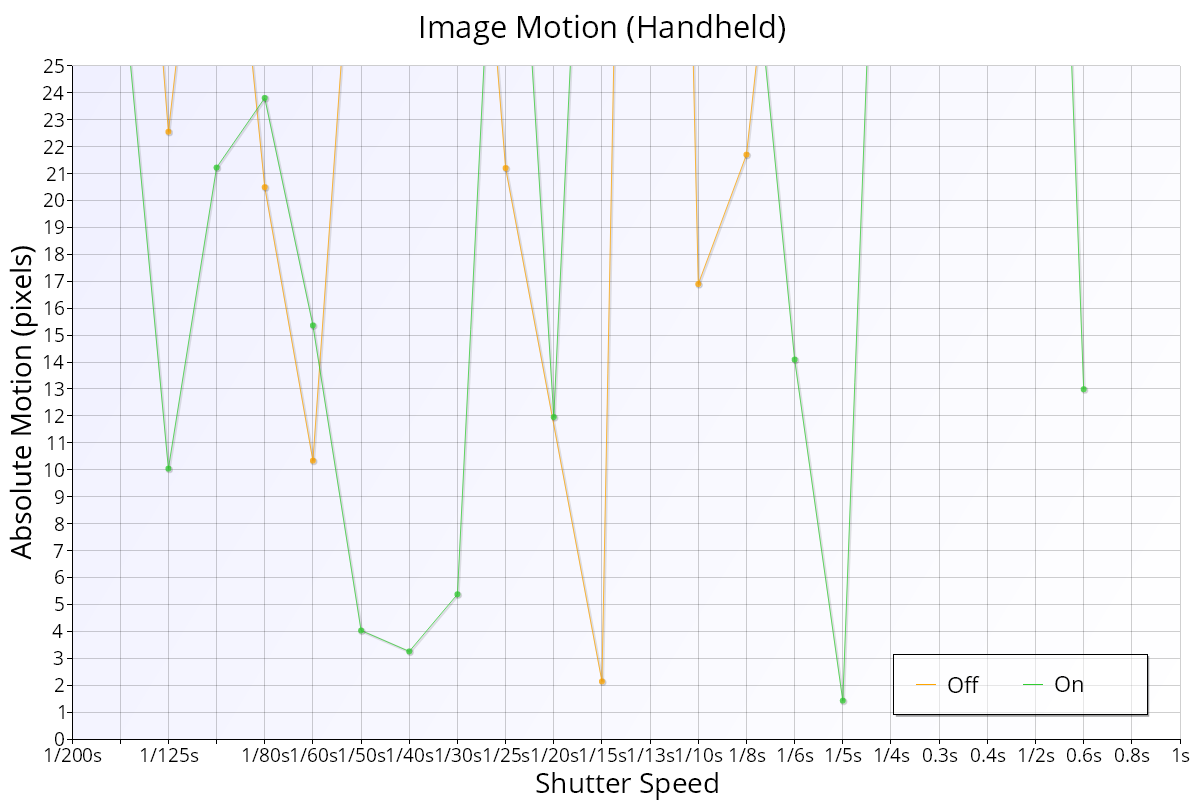
The Image Motion chart shows how far the image of the target moved in each shot, in pixels, compared with the first shot captured. Large values show the camera moved between shots, for example when hand-holding.
PreviousStops Improvement – Stabilisation TestNext Image Motion 2D – Stabilisation Test
ReikanFoCal

Reikan Technology is based on the south coast of the UK and has been making software for camera calibration and analysis since 2011.

Why FoCal

  • Why calibrate?
  • How autofocus goes wrong
  • Kit Health Check
  • How it works
  • FoCal IQ

Products

  • FoCal Desktop
  • FoCal Mobile
  • Snapshots
  • FoCal Commercial
  • Prices

Learn

  • Cameras
  • Test guides
  • Help
  • Target images
  • Blog

Support

  • Contact us
  • Technical specs
  • Renew support
  • Your account
  • Test centres
© 2011–2026 Reikan Technology Ltd · Build 3885367+Privacy · Terms · About us