Details - Calibration Check
On this page
- Test ID
- Mode
- Focus System Performance
- Result Confidence
- Shot Count
- Measurement Count
- Focus adjustment value
- Measured AF System Performance
- Maximum Quality
- Average Peak Quality and Average Measured Quality
- Reference Consistency and Autofocus Consistency
- Consistency Ratio
- AF/Capture Time
- Camera Info
- Lens Info
- Target Distance
- Target Info
- Also on the Scores tab
- Potential Improvement
- Estimated Focus Offset
- Astigmatism Factor, Red-Blue Ratio, Red:Green and Blue:Green
- Image Motion
Calibration Check collects a lot of information. The Details tab (FoCal Pro) lets you explore it in more depth:
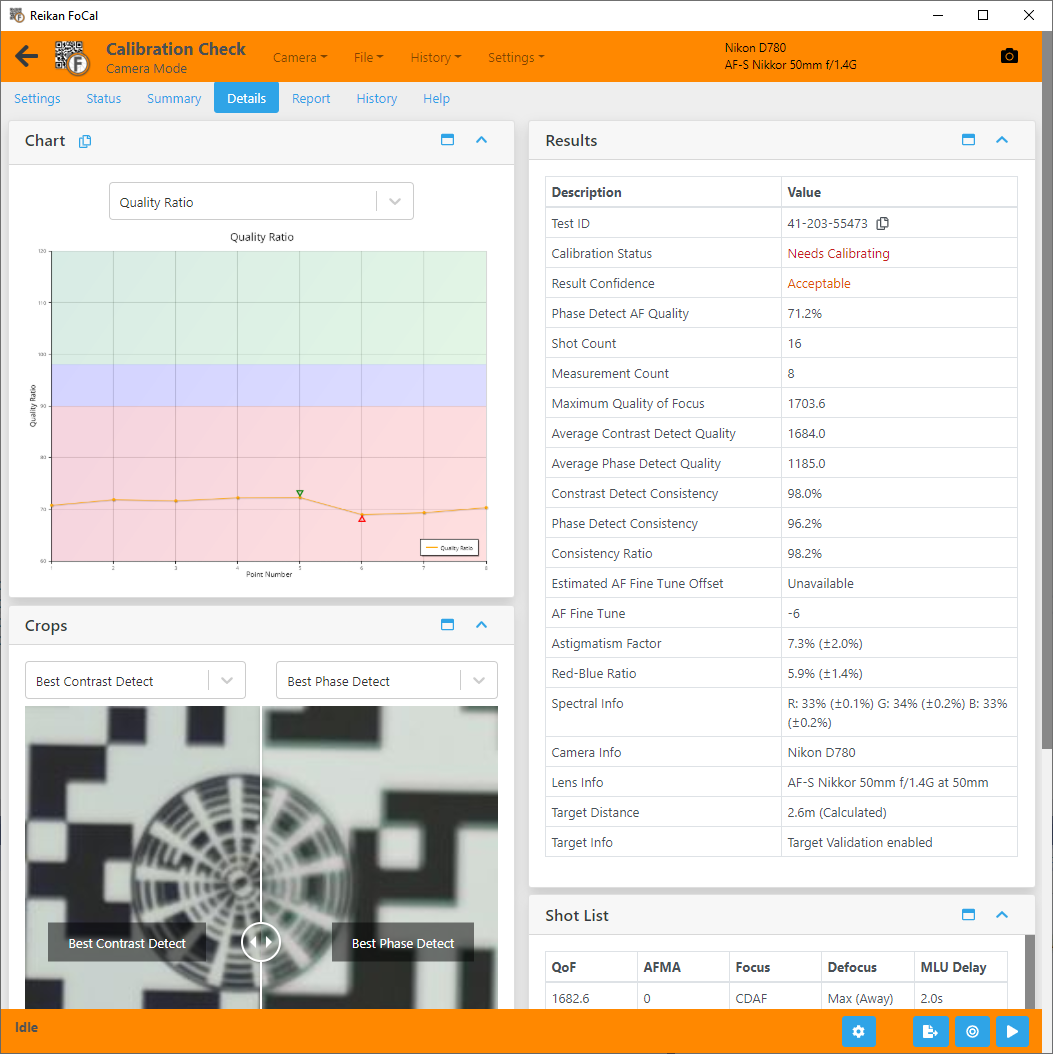
In the results below, measured shots are the camera's normal autofocus shots, and reference shots are the carefully focused shots they are compared with.
Test ID
A unique identifier for this test. Use it to refer to the test, in FoCal or when you contact Reikan support.
Mode
What was compared with what, for example Phase Detect (against FoCal AF). The reference is either FoCal's own peak search (FoCal AF) or a Live View autofocus shot, depending on the camera and the Peak Search Interval setting.
Focus System Performance
The calibration status: Calibrated, Worth Checking or Needs Calibrating, with the Focus Performance percentage. This is the median of the Autofocus System Performance measurements.
- 90% and over: calibrated.
- 59% to 90%: acceptable, but calibrating is likely to improve your pictures.
- Under 59%: calibrate the lens.
If there aren't enough measurements yet, it shows More Data Required.
Result Confidence
How confident FoCal is in the result. If the autofocus behaves erratically, the confidence is low. Use a sturdier tripod, improve the lighting and run the test again.
Shot Count
The number of pictures the camera took for the test.
Measurement Count
The number of measurements in the test. Each measurement includes a normal autofocus shot and a reference.
Focus adjustment value
The focus adjustment (AF Microadjustment, AF Fine Tune and so on) set on the camera during the test. The name matches your camera.
Measured AF System Performance
The median Focus Performance of the measured shots (FoCal Pro).
Maximum Quality
The highest Quality of Focus measured in the test, from either type of shot.
Average Peak Quality and Average Measured Quality
The average Quality of Focus of the reference shots and of the measured shots. See the Quality Value chart.
Reference Consistency and Autofocus Consistency
The Consistency of Focus across the reference shots and across the measured shots. Higher is better: it shows how closely repeated shots match.
Consistency Ratio
Only shown when the reference is a Live View autofocus shot. It compares the consistency of the measured shots with the consistency of the reference shots. 100% means both focus systems are equally consistent, which makes the result more reliable (even if neither is very consistent).
FoCal scores a ratio within 3% of 100% as excellent, within 6% as good and within 12% as acceptable.
AF/Capture Time
How long the camera took to focus and take each shot. This is mostly the autofocus time, and depends on the lens and the distance to the target.
Camera Info
Information about the camera used for the test, including its temperature if available.
Lens Info
Information about the lens used for the test, including the focal length if available.
Target Distance
The distance between the camera and the FoCal target, either calculated by FoCal from the target or reported by the camera.
Distances reported by the camera can be quite inaccurate. The Target Width setting in FoCal also affects the calculated distance.
Target Info
The target validation settings used for the test (FoCal Pro).
- Target Validation checks that the target is in the right place and orientation, and that nothing changed significantly between shots.
- Target Optimisation makes small adjustments to the analysis position to allow for small movements of the image (for example, from lens defects).
Also on the Scores tab
The Scores tab rates each part of the result from 0 to 100. As well as the results above, it includes:
Potential Improvement
How much image quality would improve if you calibrated the autofocus, as a percentage.
Estimated Focus Offset
An estimate of how far the autofocus is from the best focus, in focus adjustment units, based on how much sharper the reference is than the measured shots. 0 means a well tuned lens. More than 1 or 2 means calibrating will clearly help.
This is not the adjustment value to set, and it has no direction. For example, if the current focus adjustment is +5 and the estimated offset is 10, the right value is probably around +5 - 10 = -5 or +5 + 10 = +15. Run a full calibration to find it.
Astigmatism Factor, Red-Blue Ratio, Red:Green and Blue:Green
Optical measurements of the lens. See the Aperture Sharpness Details – Aperture Sharpness page for what each one means.
Image Motion
How far the image of the target moved on the sensor during the test, in pixels. Low values are good.