Details – Aperture Sharpness
On this page
The Details tab (FoCal Pro) lists all the results for the test. Most of them also appear as scores on the Scores tab.
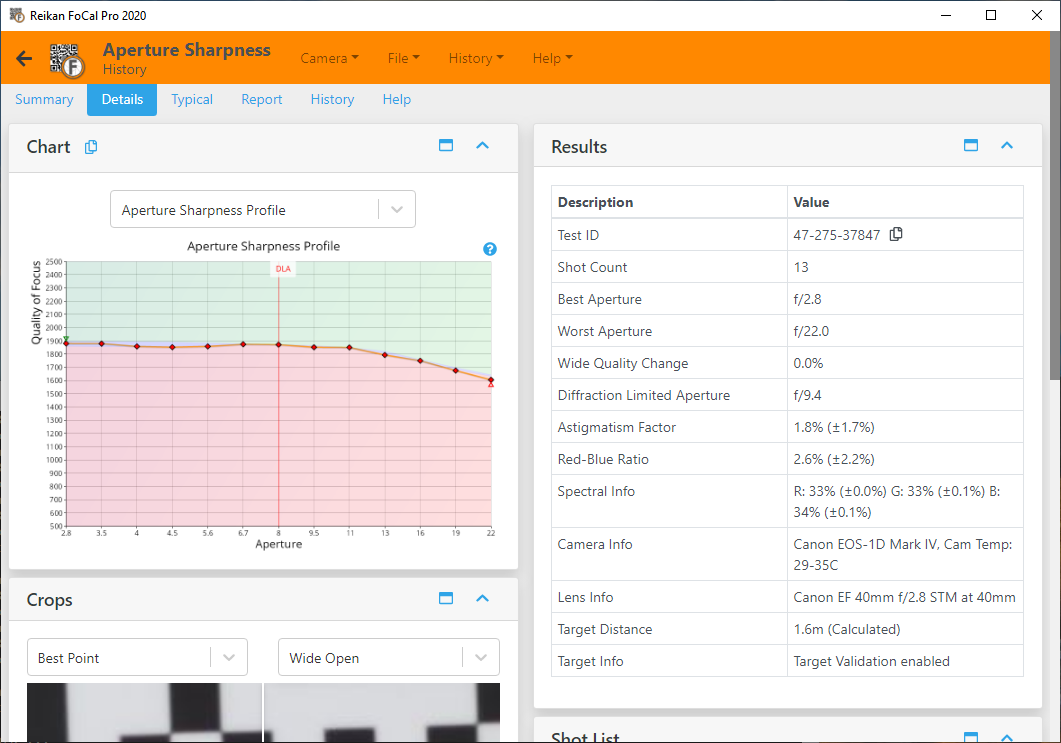
Test ID
A unique identifier for this test. Use it to refer to the test, in FoCal or when you contact Reikan support.
Shot Count
The number of images the camera captured for the test.
Best Aperture
The aperture with the highest quality measured in the test.
Worst Aperture
The aperture with the lowest quality measured in the test.
Best Point
The Quality of Focus at the best aperture.
Wide Open
The Quality of Focus with the aperture wide open.
Wide Quality Change
The change in quality from the best aperture to wide open, as a percentage of the best quality. It is 0% or negative: -8% means the lens is 8% less sharp wide open than at its best aperture.
- A modern f/4 (or even f/2.8) lens often shows a very small drop between its best aperture (typically around f/8) and wide open.
- Fast lenses (maximum aperture wider than about f/1.8) usually drop more than 10% wide open. This is expected and doesn't mean there is a problem.
- A large drop on a lens that isn't particularly fast (for example f/4) can mean a problem with the lens.
Without FoCal Comparison Data, FoCal scores a drop of up to about 5% as excellent, up to 10% as good and up to 20% as acceptable. With comparison data, the score is based on the typical drop for your camera and lens.
To find the best quality the lens can achieve, run MultiTest (see MultiTest).
Diffraction Limited Aperture
The aperture at which diffraction starts to limit sharpness with your camera's sensor. Stopping down beyond it softens the image, however good the lens.
When light passes through a small aperture it spreads out and blurs across several pixels. The smaller the camera's pixels, the wider (smaller f-number) the diffraction limited aperture.
Astigmatism Factor
How the sharpness compares in two perpendicular directions (horizontal and vertical). The result is the median over all shots, ignoring which direction is sharper, so 0% is ideal and a higher value means a bigger difference.
On the Astigmatism Factor chart, each shot is shown with its direction: above 0% when horizontal is sharper, below 0% when vertical is sharper. For example, if horizontal is 10% sharper than vertical, that shot is +10%. If vertical is 5% sharper, it is -5%.
A consistently high value can mean decentred or misaligned lens elements.
Red-Blue Ratio
The difference in quality between the red and blue channels. The result is the median over all shots, ignoring which channel is sharper, so 0% is ideal. High values mean the colours are focused at different points (chromatic aberration), which can show as colour fringing.
On the Red-Blue Ratio chart, each shot is shown with its direction: above 0% when red is sharper, below 0% when blue is sharper.
Red:Green and Blue:Green
The quality of the red and blue channels compared with green, as a median over all shots. 100% means the channel is as sharp as green. Values a little below 100% are typical. See the Red-Blue Quality chart.
Image Motion
How far the image of the target moved on the sensor during the test, as a median in pixels. Low values are good. See the Image Motion chart.
Spectral Info
The make-up of the light used for the analysis: the red, green and blue powers measured by the camera after image processing.
In JPEG mode, the camera's processing can affect this a lot.
In Raw mode, FoCal compensates for the camera's colour filters to estimate the real lighting. How accurate this is depends on how close the colour temperature in the FoCal settings is to your actual lighting.
Use this as a check for roughly white lighting, with all three values around 33%. If one value is far from 33% (for example above 50% or below 10%), the results are unlikely to represent normal shooting conditions.
Camera Info
Information about the camera used for the test, including its temperature if available.
Lens Info
Information about the lens used for the test, including the focal length if available.
Target Distance
The distance between the camera and the FoCal target, either calculated by FoCal from the target or reported by the camera.
Distances reported by the camera can be quite inaccurate. The Target Width setting in FoCal also affects the calculated distance.
Target Info
The target validation settings used for the test.
- Target Validation checks that the target is in the right place and orientation, and that nothing changed significantly between shots.
- Target Optimisation makes small adjustments to the analysis position to allow for small movements of the image (for example, from lens defects).