Details – Dust Analysis
On this page
The Details tab (FoCal Pro) lists all the results for the test.
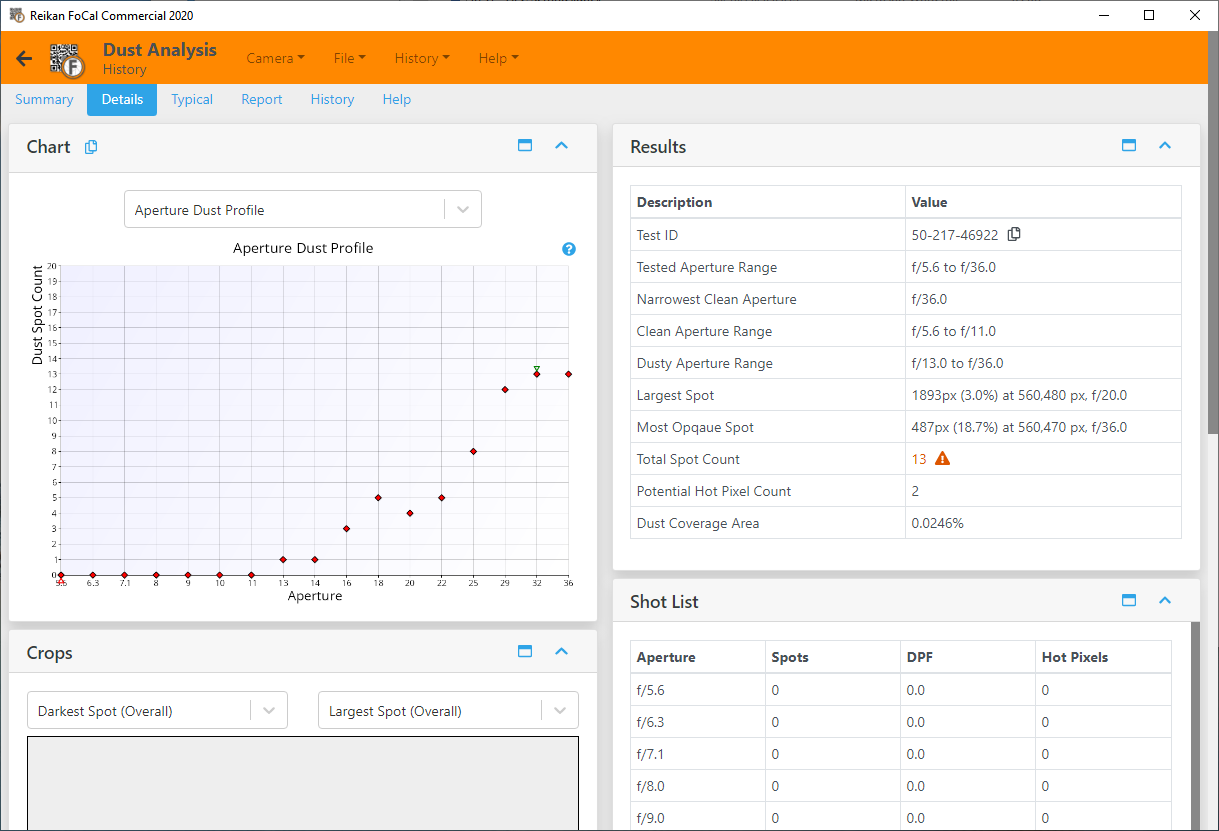
FoCal only counts a dust spot when it appears in the same place across several apertures (a high-confidence spot). All the results below use these spots.
Test ID
A unique identifier for this test. Use it to refer to the test, in FoCal or when you contact Reikan support.
Tested Aperture Range
The range of apertures measured in the test.
Narrowest Clean Aperture
The smallest aperture (largest f-number) at which no high-confidence dust spots were found.
Clean Aperture Range
The apertures at which no high-confidence dust spots were found. It almost always runs from wide open to the Narrowest Clean Aperture. Pictures taken in this range should show no dust spots.
Dusty Aperture Range
The apertures at which dust spots were found, from the widest aperture with a spot to the smallest aperture tested. Pictures taken in this range may show spots, especially in large plain areas such as sky.
Largest Spot
The largest dust spot: its size, its position, and the aperture at which it appears largest.
Most Opaque Spot
The darkest dust spot: its size, its position, and the aperture at which it appears most opaque.
Total Spot Count
The number of high-confidence dust spots found on the sensor across all apertures. It is highlighted as a warning when it is above 10.
Potential Hot Pixel Count
The number of potential hot pixels: pixels that seem to be stuck bright. See Potential Hot Pixels – Dust Analysis. It is highlighted as a warning when it is above 10.
Dust Coverage Area
The percentage of the sensor area covered by dust, at the smallest aperture tested. See Percentage Area Affected – Dust Analysis.