Test Settings
On this page
The Test Settings tab of Help › Settings. These settings apply to every test.
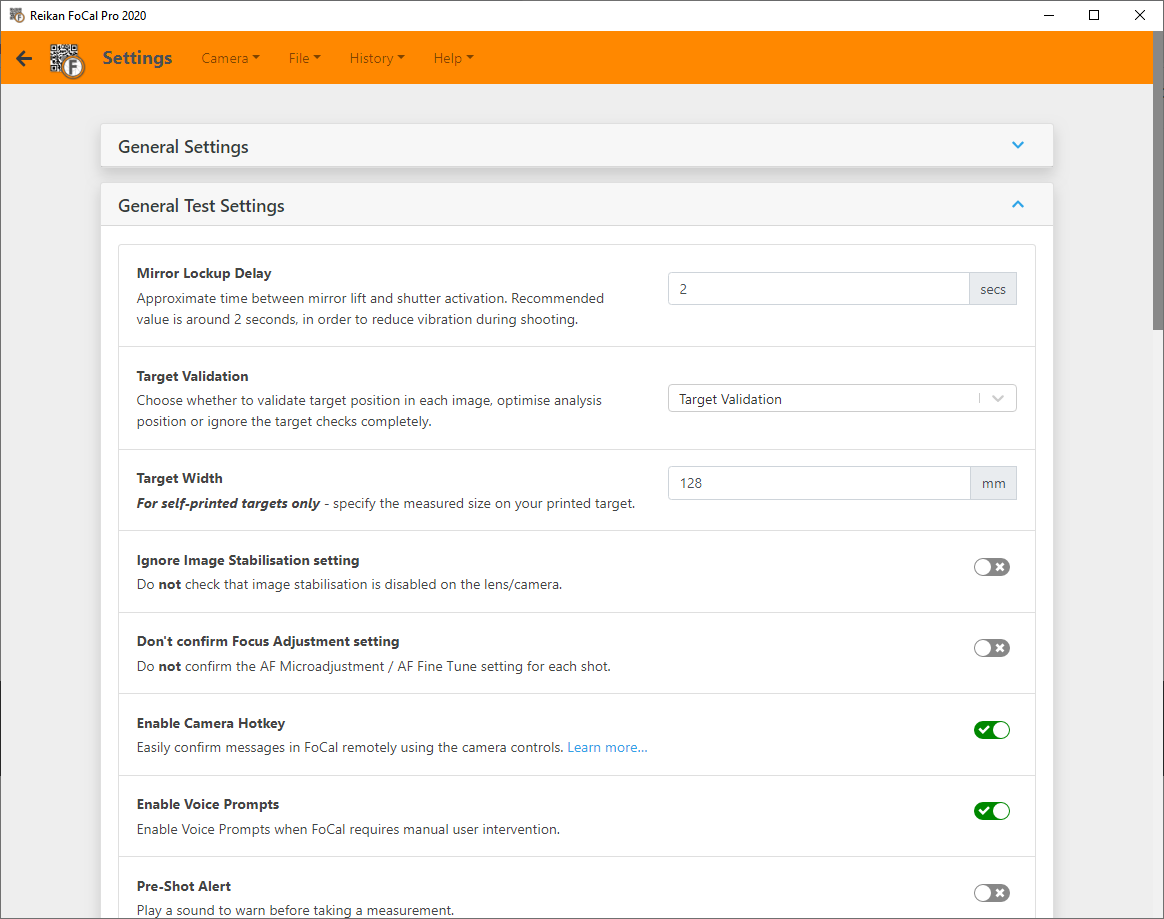
Mirror Lockup Delay
To keep the camera as still as possible, FoCal uses mirror lockup on DSLRs. After the mirror goes up, FoCal waits for this delay before firing the shutter.
The default is 2 seconds. You may want to increase it with long telephoto lenses or a light tripod. This setting has no effect on mirrorless cameras.
Target Validation
FoCal recognises the FoCal target and uses it to check your setup during a test. Choose:
- Target Validation (default): FoCal checks the target's position, distance, rotation and so on in each shot, and warns you about any significant changes that could affect the test.
- Target Optimisation: FoCal also uses what it knows about the target to adjust the analysis. This may give better results with long lenses or in less stable conditions.
- No Target Validation: turns the target checks off, for example if you want to use your own high-contrast target. FoCal's analysis is designed for the FoCal target, so your results may not be correct. For advanced users only.
Target Width
For self-printed targets only. FoCal uses the size of the target to work out the distance from the camera to the target.
If you printed your own target, measure the distance marked on the printed target and enter it here. If you printed it at standard size on A4 or US Letter paper, the default (128.0mm) is fine. If you scaled the target up or down, enter the measured value.
For a standard (150mm) FoCal Hard Target, leave this at 128.0mm. For a large FoCal Hard Target, this setting is ignored.
This setting only affects the reported target distance. A wrong value doesn't change any test results.
Ignore Image Stabilisation setting
For most tests, image stabilisation* must be turned off on the camera and lens. Where it can, FoCal checks and warns you if stabilisation is on.
Some cameras, because of firmware bugs or communication problems with third-party lenses, wrongly report that stabilisation is on. If FoCal warns you about stabilisation and you're sure it's off, turn on this setting to skip the check.
(* FoCal uses "image stabilisation" for all the makers' systems: Canon Image Stabilisation (IS), Nikon Vibration Reduction (VR), Sigma Optical Stabilisation (OS), Tamron Vibration Compensation (VC), Sony SteadyShot and so on.)
Don't confirm Focus Adjustment setting
FoCal normally checks, for each shot, that the camera has applied the Focus Adjustment (AF Microadjustment / AF Fine-Tune) value it asked for. A few cameras report this value wrongly in their images, so FoCal warns that it hasn't been applied.
If you're setting the correct value but FoCal says it's wrong, turn on this setting to skip the check.
Use this with care. It turns off an important safety check. The only camera we know of that misreports this setting is the Nikon D300S. With User Assisted Mode cameras, you must make sure you enter the value FoCal asks for on the camera, because FoCal won't check it.
Enable Camera Hotkey
With a User Assisted Mode camera, FoCal asks you to change the AF Microadjustment / AF Fine-Tune value on the camera from time to time, which usually means walking over to the camera.
The Camera Hotkey lets you use the camera's controls to tell FoCal you've made the change, so the test can continue. See User Assisted Mode (UAM).
Enable Voice Prompts
FoCal speaks its instructions when it needs you to do something, such as change the AF Microadjustment / AF Fine-Tune value. With the Camera Hotkey, this lets you run a whole test from beside the camera. See User Assisted Mode (UAM).
Pre/Post-Shot Alert
Plays a sound before and after each measurement shot, so you know when it's safe to walk in front of the camera during a long test.
Maximum Crop Size
Limits how far image crops are enlarged on screen: 100%, 200% or No Limit.
Side-by-side Crops
Shows crop images side by side instead of with a comparison slider.