General Settings
On this page
- Notify about FoCal Updates
- Notify about camera time difference
- Notify about camera firmware
- Distance Units
- Pre-Test Info Messages
- Restore Dismissable Messages
- Upload Results
- Cache size limit / Current Cache Size
- Restore Program Defaults
- User Interface Zoom
- Expert Mode
- Reduce Visual Effects
- Enable Canon WiFi / Enable Nikon WiFi
The General tab of Help › Settings.
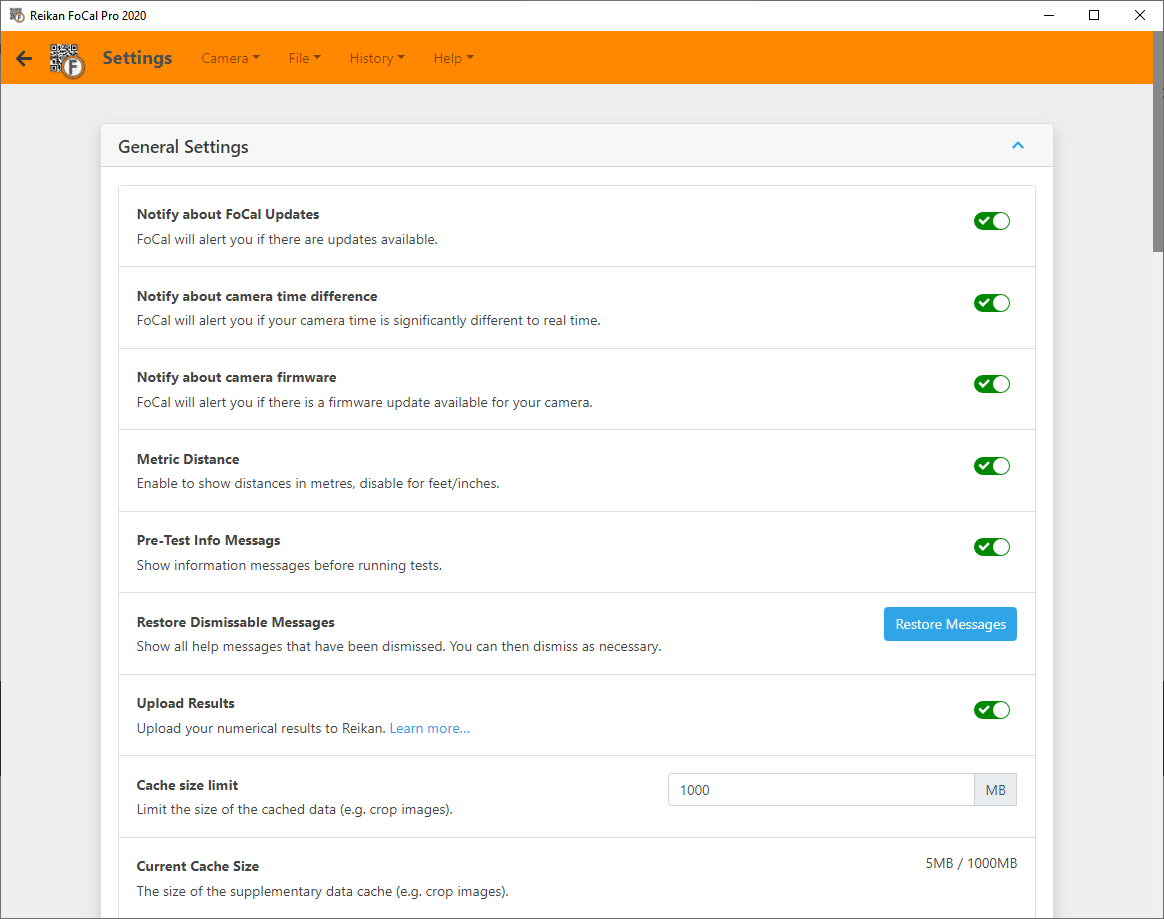
Notify about FoCal Updates
FoCal tells you when a new version is available. To choose which releases you're told about (Stable, Beta or Alpha), use Help › Check for Update: see Update Channels.
Notify about camera time difference
FoCal warns you when you connect a camera whose clock is significantly different from your computer's. Two values control this:
- Correct Time Offset: the number of seconds' difference that still counts as correct.
- Alert Offset: if the difference is greater than this, FoCal shows a warning when you connect.
To set the camera's clock from your computer, use Camera Tools: see Camera Tools: Time Sync.
Notify about camera firmware
FoCal tells you when there's a firmware update available for your camera.
Distance Units
Show distances in Metres (the default) or Feet/inches.
Pre-Test Info Messages
FoCal shows information messages before a test about things that could affect your results, for example a battery grip fitted, or an uncovered eyepiece on a DSLR.
Experienced users may find these repetitive and can turn them off, but we recommend leaving them on.
Restore Dismissable Messages
Some messages have a Don't show again option. Click Restore Messages to show all of them again. You can still dismiss each one again later.
Upload Results
Uploads the numerical results of your tests to Reikan. These uploads build FoCal Comparison Data, which lets you compare your results with other FoCal users of the same camera and lens.
FoCal never uploads your images: only the numerical results from the tests and some information about the camera and lens settings. See Upload Results to Reikan.
Cache size limit / Current Cache Size
FoCal keeps image crops from your tests on your computer, so you can see the actual images when you look back at results in History. Cache size limit sets how much space they can use (default 1000MB). When the limit is reached, the oldest crops are removed.
Current Cache Size shows how much space the crops use now.
Restore Program Defaults
Click Restore Defaults to put all FoCal settings back to how they are after a new installation. Your licence is kept. This can help if you're having problems with FoCal.
User Interface Zoom
Makes FoCal's text, buttons and other elements larger or smaller, for example on a small screen. The default is 100%.
Expert Mode
Hides help links and similar guidance, for experienced users.
Reduce Visual Effects
Uses solid panels instead of the frosted glass look, and turns off animations. This can help on slower computers, or if the display feels sluggish. FoCal also follows your system's "reduce motion" setting.
Enable Canon WiFi / Enable Nikon WiFi
Lets FoCal find and connect to supported Canon or Nikon cameras over Wi-Fi.
For Nikon, the IP Address setting controls how FoCal finds the camera:
- Leave it empty to find the camera automatically on your home or office network.
- For the camera's hotspot ("Easy") mode, enter the camera's IP address (usually 192.168.1.1).