Details – Calibration
On this page
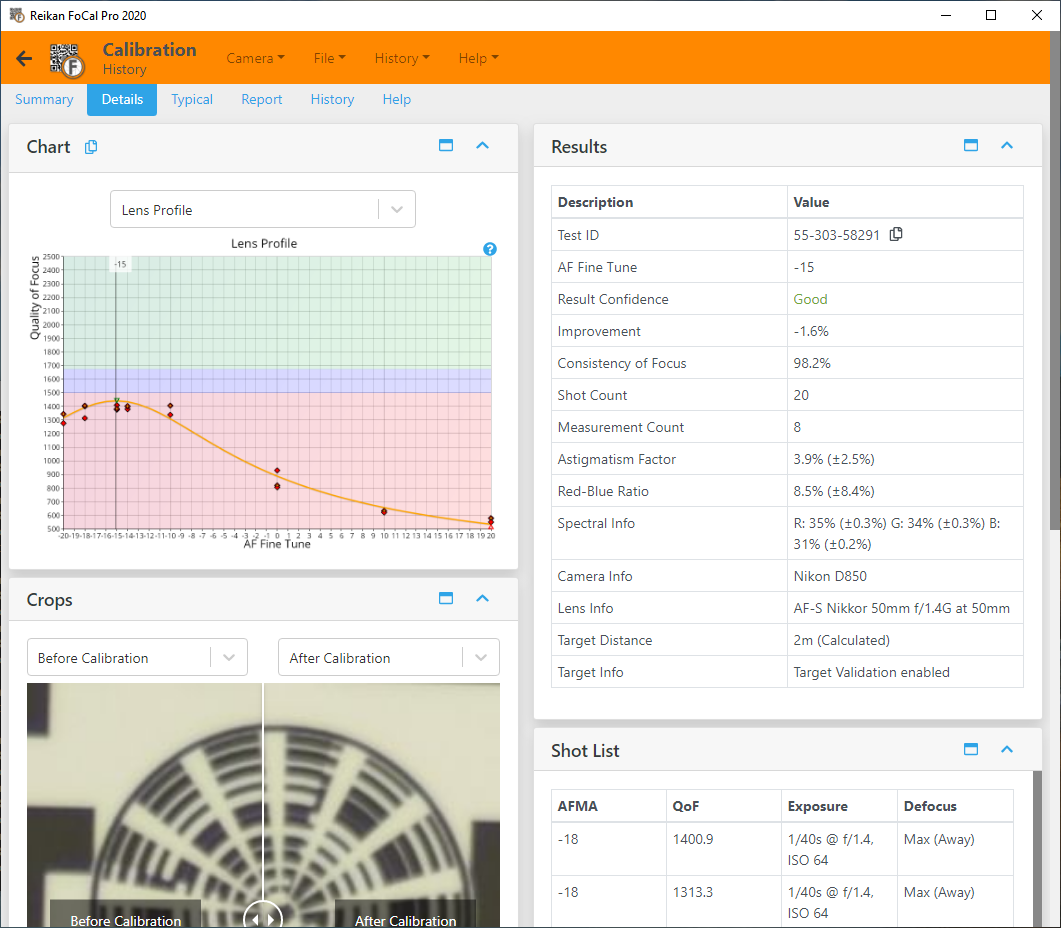
The Details tab (FoCal Pro) lists every result for the test, alongside the charts, the shot list and the crops. Most results also appear as a score on the Scores tab.
Test ID
A unique identifier for this test. Use it to refer to the test within FoCal and when you contact Reikan Support. Use the copy button to copy it.
Focus Adjustment
The best focus adjustment value for the test, based on the measurements so far. The name follows your camera, for example AF Microadjustment or AF Fine Tune. This is the value to set in the camera.
As a guide, an adjustment of 0 to 1 is minimal, 2 to 3 is noticeable and 4 or more is significant: from 2 upwards, you'll usually see the improvement in your photos. A larger value is fine as long as it is within the camera's adjustment range.
Result Confidence
How well the measurements fit FoCal's model of how a lens behaves. A high value means a good, repeatable set of measurements. A low value means the measurements varied a lot or changed unexpectedly. If it is low, check the light and the tripod and run the test again.
Quality Improvement
How much sharper the image is at the calibrated value than at the value set before the test, as a percentage. A small value means the lens was already well calibrated.
Maximum Quality
The best Quality of Focus measured in the test: the sharpness at the peak of the Lens Profile - Fully Auto Calibration chart.
Consistency of Focus
How repeatable the autofocus was close to the calibration result. It is only meaningful once there is a calibration result. See Focus Consistency - Fully Auto Calibration.
Shot Count
The number of images the camera captured during the test.
Measurement Count
The number of Focus Adjustment values with a valid quality result. Each one may need several shots.
Astigmatism Factor
Compares the sharpness in two perpendicular directions (horizontal and vertical). A value well away from 0% can mean a decentred or misaligned lens element, or vibration during the test.
For each shot, FoCal works out how much sharper one direction is than the other, as a percentage:
- If horizontal and vertical are equally sharp, the value is 0%.
- If the horizontal direction is 10% sharper, the shot's value is +10%.
- If the vertical direction is 5% sharper, the shot's value is -5%.
The result shown here is the median for the test, ignoring direction (the median of the absolute values). The Astigmatism Factor - Fully Auto Calibration chart shows each shot with its sign.
Red-Blue Ratio
The difference in sharpness between the red and blue channels. A high value can mean the colours are separating (chromatic aberration) in the area FoCal analyses. In a photo, this shows as colour fringing.
For each shot:
- If red and blue are equally sharp, the value is 0%.
- If red is 10% sharper than blue, the shot's value is +10%.
- If blue is 5% sharper than red, the shot's value is -5%.
The result shown here is the median for the test, ignoring which colour is sharper. The Red-Blue Ratio - Fully Auto Calibration chart shows each shot with its sign.
Red:Green and Blue:Green
The sharpness of the red and blue channels as a percentage of the green channel (median for the test). 100% means the same as green. See Red-Blue Quality - Fully Auto Calibration.
Image Motion
How far the image of the target moved on the sensor during the test, in pixels (median for the test). See Image Motion - Fully Auto Calibration.
AF/Capture Time
The time from FoCal asking the camera to take a shot to the camera confirming it has been taken, in milliseconds (median and range). This is mostly the time the camera takes to autofocus. It depends on the lens and on the distance to the target.
Spectral Info
The make-up of the light used for the test: the red, green and blue power as measured by the camera after image processing.
In JPEG mode, the camera's own processing can affect these values a lot.
In Raw mode, FoCal allows for the colour filter on the sensor and tries to show the real light. The accuracy depends on how close the Colour Temperature in FoCal's settings is to the real light.
Use this as a check that the light is roughly white, with all three values around 33%. If one value is far from 33% (for example above 50% or below 10%), the results are unlikely to represent normal shooting.
Camera Info
Information about the camera used for the test, including its temperature if available.
Lens Info
Information about the lens used for the test, including the focal length if available.
Target Distance
The distance between the camera and the FoCal target, either calculated by FoCal from the target or reported by the camera.
Distances reported by the camera can be quite inaccurate. The Target Width setting in FoCal also affects the calculated distance, so make sure it matches your printed target.
Target Info
The target settings used for this test.
Target Validation checks that the target is in the right place and orientation, and that nothing has changed much between shots.
Target Optimisation makes small adjustments to the analysis position to allow for small movements of the image, for example from lens defects.